
 Zoe Nora
Did you know modern digital systems capture over 44,000 sound snapshots each second to recreate your music? This process shapes how we record and hear audio today. Understanding your sample rate matters for studio work and web content.
This setting shows how often an analog signal is measured. It sets the highest frequency a digital system can capture accurately. Many beginners think higher numbers always sound better, but the choice is more complex.
Your project goals, hardware limits, and final format guide the choice.
When choosing an audio sample rate, consider processing needs and storage space. This guide explains why 44.1 kHz, 48 kHz, and 96 kHz remain industry standards. We aim to help you make informed choices, so your recordings sound clear and professional.
Key Takeaways
- The setting defines how often analog signals are measured during conversion.
- Higher values do not automatically guarantee better sound quality for every project.
- Choosing the right frequency depends on your hardware and final delivery format.
- Processing power and storage needs increase significantly at higher settings.
- Standard options like 44.1 kHz and 48 kHz cover most professional requirements.
What Is Sample Rate?
At the heart of every digital recording lies a process called the sample rate. When we record sound, we take thousands of snapshots of an analog waveform every second. These snapshots let computers store and process audio as numbers.
The process begins when an analog-to-digital converter (ADC) measures the voltage of an incoming signal. During playback, a digital-to-analog converter (DAC) reads these values to rebuild the original sound wave. This cycle of measurement and reconstruction defines the digital audio sample rate.
Definition of Sample Rate
In technical terms, the sampling frequency means the number of samples taken per second. At 44.1 kHz, a system captures 44,100 measurements of the audio signal every second. This speed captures the rapid vibrations that create complex sounds.
It is important to distinguish bit depth from the audio sample rate. The sample rate sets the frequency range we can capture, while bit depth controls each sample’s amplitude precision and dynamic detail. Together, these factors define your project’s overall audio resolution.
Importance in Audio Quality
These measurements help digital files sound close to their original source. Because humans can typically hear frequencies up to 20 kHz, the sampling frequency must be at least double that. Standard rates are set above 40 kHz, so they capture the full spectrum of human hearing.
The settings you choose affect the clarity and accuracy of your final output. The following table shows the main differences between these two essential parts of digital recording.
| Feature | Primary Function | Impact on Audio | Common Metric |
|---|---|---|---|
| Sample Rate | Frequency Range | Captures high-end detail | kHz (e.g., 44.1, 48) |
| Bit Depth | Dynamic Range | Controls noise floor | Bits (e.g., 16, 24) |
| Audio Resolution | Overall Fidelity | Defines total quality | Combined specs |
By balancing your audio resolution settings, you keep recordings clean and professional. Understanding how the digital audio sample rate works with your hardware is the first step toward mastering high-quality sound production.
How Sample Rate Affects Sound Quality
When we record audio, the sample rate sets the foundation for the full frequency spectrum. It shows how many times each second equipment captures a sound wave snapshot. Choosing the right sampling frequency keeps the digital version faithful to the original performance.
Understanding Frequency Response
The digital audio sample rate sets the highest frequency a system can record accurately. Physics limits recording to frequencies up to half the total sample rate. This limit is called the Nyquist frequency.
These common industry standards show how this works in practice:
- 44.1 kHz: This standard provides a theoretical upper limit of 22.05 kHz, which covers the full range of human hearing.
- 96 kHz: This higher rate extends the potential frequency response up to 48 kHz, allowing for more headroom in professional processing.
Nyquist Theorem Explained
The Nyquist theorem helps prevent aliasing, a type of digital distortion. Frequencies above the Nyquist limit fold back into the audible range. This creates unnatural harmonics that can ruin recording clarity.
Modern converters use anti-aliasing filters before conversion, and many high-end devices use internal oversampling. They process audio at a much higher rate, then down-sample it to the final output. This preserves pristine audio quality and manages potential artifacts.
Understanding these limits helps us make better studio decisions. Whether we track a live band or mix a complex project, the sampling frequency guides our choices. It keeps digital audio clean, accurate, and free from unwanted digital noise.
Common Sample Rates Explained
Choosing the right recording sample rate depends on where your audio will be used. Many options exist, but standards serve different media formats. These choices support compatibility and efficient professional workflows.
44.1 kHz: The CD Standard
The 44.1 kHz sampling frequency has supported the music industry for decades. It was chosen to fit compact discs’ storage capacity while capturing the full range of human hearing. For most music sample rate needs, it remains the gold standard because it is efficient and widely compatible.
48 kHz: For Film and Video
For film, television, and online streaming, 48 kHz is the preferred choice. It matches video frame rates, keeping audio and visual elements perfectly synced. Most modern digital interfaces and broadcast equipment default to this rate for industry-wide consistency.
Higher Rates: 96 kHz and Beyond
Some engineers choose 96 kHz for projects needing heavy processing or extreme time manipulation. Because it captures more data, this higher recording sample rate can reduce aliasing artifacts during intense digital signal processing. It provides extra headroom for complex mixing, but it does not guarantee better sound for the average listener.
We often view 192 kHz as a specialized option for niche applications. It offers extreme precision, but its massive files place heavy demands on computer systems. In most standard production environments, its benefits rarely justify the significant increase in storage and processing demands.
Sample Rate Conversion
Digital audio files often need changes to meet delivery requirements through sample rate conversion. This process helps when moving audio among music production, video editing, broadcast, and streaming platforms.
Each medium often requires a specific standard for compatibility. Managing these changes helps audio sound consistent across playback devices.
Why Convert Sample Rates?
Changing rates involves upsampling and downsampling. Upsampling raises the rate, while downsampling lowers it to meet a target specification.
Remember that upsampling cannot restore detail missing from the original recording. At a lower recording rate, high-frequency information is already gone. Raising the rate later creates a larger file without adding sonic clarity.
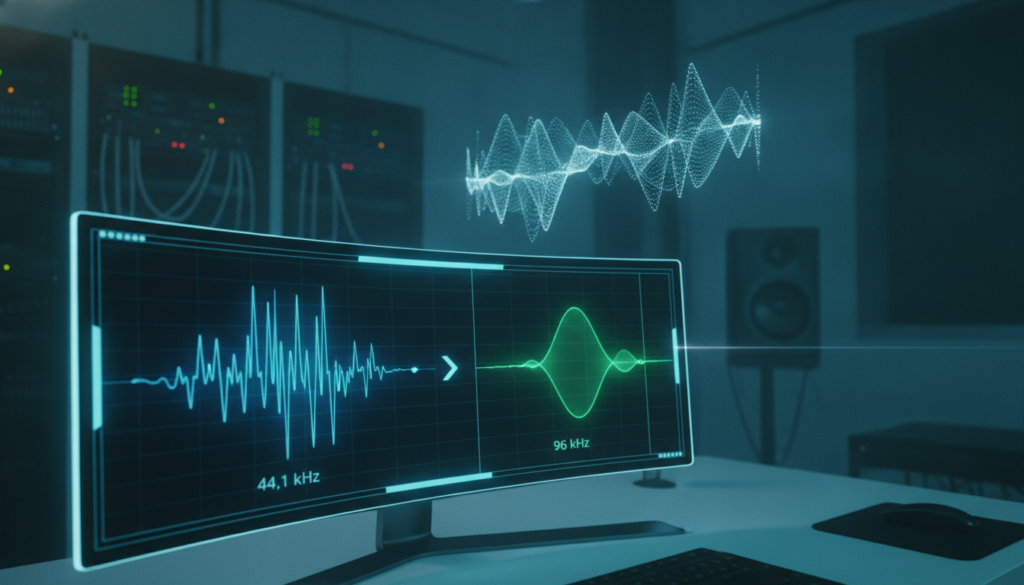
Keep your project at one consistent rate from start to finish. Perform unavoidable sample rate conversion only once, preferably during final mastering, to reduce digital artifacts.
Tools for Sample Rate Conversion
Professional audio engineers use high-quality software for these transitions. Tools like iZotope RX, SoX, and built-in engines in professional DAWs provide precise, clean results.
When choosing tools, focus on filter quality and aliasing control. Poor conversion can add unwanted noise or distortion to your audio signal.
Check your export settings before finalizing files. A high-quality sample rate conversion algorithm maintains your audio’s integrity between complex production formats.
Sample Rate and Bit Depth: The Pairing
To capture great sound, we must balance the digital audio sample rate and signal depth. These settings work together, but each serves a different role during recording. Knowing these roles helps us make better choices in every session.
What Is Bit Depth?
If the sample rate measures time, bit depth measures amplitude. It sets the audio resolution for each sample from your interface. Higher bit depth provides more dynamic range, capturing quiet whispers and loud peaks accurately.
Most modern professional recordings use 24-bit depth as the standard. It provides wide dynamic range, prevents digital clipping, and keeps the noise floor low. A higher bit depth gives our digital audio sample rate enough headroom for performance details.
How They Work Together
These settings are not competitors; they work as partners. A high sample rate cannot fix poor gain staging or a noisy recording space. Even the best audio resolution cannot save a weak or distorted source signal.
The following table shows how these specifications affect your workflow and final sound quality:
| Specification | Primary Function | Impact on Sound |
|---|---|---|
| Sample Rate | Time-based frequency | Defines the highest frequency captured |
| Bit Depth | Amplitude resolution | Defines dynamic range and noise floor |
| Combined Effect | Overall fidelity | Determines total digital signal accuracy |
In the end, focus on the entire signal chain instead of one setting. Proper microphone placement, clean preamps, and careful gain staging remain vital. Combined with sound digital knowledge, these practices produce professional results every time.
Choosing the Right Sample Rate for Your Project
We often find the best recording sample rate depends more on your final output destination than raw technical specifications. Selecting an optimal sample rate is a critical decision that balances high-fidelity audio with your computer’s actual performance capabilities.
Factors to Consider
When deciding on a sample rate, evaluate several technical constraints. Your computer’s CPU power and available storage capacity are primary concerns because higher rates demand more resources.
- Project Destination: Where will the audio live? Streaming platforms and video projects often have specific requirements.
- Plugin Usage: Complex virtual instruments and heavy processing chains can tax your system at higher rates.
- Latency Requirements: Lower buffer settings are easier to maintain at standard rates, which is vital for live monitoring.
“The goal is to choose a setting that serves the music without creating unnecessary technical bottlenecks during the creative process.”
Typical Use Cases
For most professional video and streaming projects, 48 kHz is the industry standard. This audio sample rate provides excellent clarity and works well with video editing software and web delivery formats.
By contrast, high-end music sample rate choices like 96 kHz suit specialized sound design or projects requiring extensive pitch-shifting. These higher rates provide more headroom for audio manipulation, but they require stronger hardware.
We recommend testing your system before a major session to ensure stability. Always perform your sample rate conversion after the main production workflow ends to preserve the highest possible signal integrity.
Sample Rate in Digital Audio Workstations (DAWs)
When you open your DAW, the initial sample rate setting guides your entire project workflow. Set it before recording to prevent technical problems later in production. Make sure your software settings match your hardware capabilities.
Popular DAWs and Their Default Rates
Most modern software platforms default to 44.1 kHz, the industry standard for music production. This audio sample rate works well with CD formats and streaming services. However, many professional environments now use 48 kHz as a standard starting point.
Applications like Ableton Live, Logic Pro, and Avid Pro Tools let users select their preferred frequency when creating a project. While 44.1 kHz remains the go-to for pure music, 48 kHz is generally preferable for video and livestream production. Choosing early keeps files consistent throughout the creative cycle.
Customizing Sample Rates in Your DAW
Changing these settings requires care across the entire signal chain. Check that your audio interface, plugins, and imported media files match the project settings. This prevents unwanted resampling and helps maintain signal integrity.
Higher settings increase the computer’s processing demands. A higher audio sample rate may reduce track counts or plugin capacity during complex mixing sessions. Balance high-fidelity audio needs with hardware limits for a smooth, uninterrupted creative experience.
The Role of Sample Rate in Music Production
Choices during tracking shape our music’s final sound. Choosing the right sample rate supports the workflow, plugin performance, and final master quality.
Recording Techniques and Sample Rate
When starting a project, the recording sample rate often depends on session complexity. For standard acoustic projects, 44.1 kHz or 48 kHz remains the industry standard for efficiency and compatibility.
We often choose 96 kHz for sound design or heavy pitch-shifting tasks. Higher rates give digital tools more room to stretch audio without unwanted artifacts. This choice needs more processing power, but the increased fidelity suits complex creative work.
Mixing and Mastering Considerations
During mixing, watch how nonlinear plugins interact with the digital environment. Many plugins create harmonics that may cause aliasing when the Nyquist frequency is too low. Higher settings or plugin oversampling help preserve a clean, professional sound.
Keep settings consistent throughout production to avoid needless sample rate conversion. When preparing final masters, high-quality conversion helps preserve audio integrity for listeners. Always check session settings before the final bounce.
| Production Task | Recommended Rate | Primary Benefit |
|---|---|---|
| Standard Tracking | 48 kHz | High compatibility |
| Sound Design | 96 kHz | Artifact reduction |
| Final Mastering | 96 kHz | Maximum precision |
| Archival Storage | 44.1 kHz | Storage efficiency |
Choose the music sample rate that fits your hardware and project goals. By balancing resource use and sonic needs, we can achieve professional results in any digital environment.
Common Misconceptions About Sample Rate
Many people believe that raising the sample rate guarantees a better listening experience. Bigger numbers may seem better, but digital audio is more complex. Many factors beyond technical specifications shape the final sound quality you hear.
Higher Sample Rate Equals Better Quality?
Many people assume that a higher digital audio sample rate always creates a more accurate recording. Microphone quality, room acoustics, and converter performance matter much more to the final output. Extreme settings can create technical challenges without audible benefits for listeners.
Focusing only on audio resolution can make us overlook the signal chain. High-quality preamps and clean gain staging often matter more than the highest software setting. Remember that technical headroom does not always create a better musical result.
Sample Rate and Listener Experience
An unnecessarily high setting can hurt your production workflow. It can reduce system stability, raise storage costs, and make delivery more complex. To learn more about setup optimization, explore how to enjoy high-res streaming on your favorite devices to better understand playback.
The listener experience depends on the entire playback chain, from the source file to speakers or headphones. We recommend balancing high audio resolution with a smooth, efficient production process. Avoid chasing higher numbers, and focus on the music’s clarity and emotion.
Future Trends in Sample Rate Technology
Digital audio and sample rate technology keep evolving as converter design and plugin oversampling improve. These advances help us achieve high-fidelity results while using system resources wisely. Smarter workflows now support both efficiency and clear sound.
Modern Hardware and Industry Standards
The Recording Academy offers helpful guidance for high-resolution production. It lists 48 kHz as a solid minimum and 96 kHz as a preferred target for professional delivery. Modern audio interfaces handle these higher rates easily, reducing the technical load on our computers.
Selecting Your Workflow
Our optimal sample rate should match technical goals and the intended distribution format. Rates of 44.1 kHz and 48 kHz remain practical standards for most projects. We reserve rates above 96 kHz for specialized scientific work or complex sound design requirements.
Choose settings based on your specific project needs. We encourage you to test different configurations and find what suits your creative process. A consistent approach keeps your audio professional and reliable across all platforms.