
 Zoe Nora
DIY home theater brings the magic of cinema right into your living space, allowing you to enjoy movies, shows, and games in stunning quality. Crafting your own home theater is not only a rewarding project but also an opportunity to create a personalized entertainment hub that suits your style and needs.
This guide will walk you through everything from essential components and layout planning to advanced technology and budget considerations, ensuring you have all the tools needed to create an immersive viewing experience that rivals any commercial theater.
Understanding the Components Required for a DIY Home Theater
Creating a DIY home theater can be an exciting project that transforms your living space into a cinematic experience. It requires careful planning and knowledge of the essential components that will work together to deliver high-quality audio and visual performance. Each element plays a crucial role in ensuring that you achieve the best possible setup tailored to your preferences and space.
The primary components of a DIY home theater include a projector or screen, audio system, source devices, seating, and sometimes additional accessories. Understanding the function and specifications of each item is vital for a cohesive setup. A well-balanced selection of these components will create an immersive viewing experience that enhances movie nights, sports events, or gaming sessions.
Essential Components of a DIY Home Theater
A comprehensive understanding of the essential components is key to a successful DIY home theater project. Below is a breakdown of the main components, their roles, and considerations for selection.
- Projector or Screen: The projector is vital for displaying visuals, while the screen enhances image quality. It’s important to choose a projector that matches the screen size and resolution for optimal performance.
- Audio System: A high-quality audio system brings movies to life. This includes speakers, subwoofers, and receivers that work together to deliver surround sound. Room size and acoustics significantly influence the choice of audio equipment.
- Source Devices: These are the devices that provide content, such as Blu-ray players, streaming devices, or gaming consoles. Ensure compatibility with the audio and video components.
- Seating: Comfortable seating enhances the viewing experience. Options vary from recliners to dedicated theater seats, depending on personal preference and available space.
- Accessories: Accessories like remote controls, cables, and projector mounts can assist in achieving a more organized and functional setup.
Comparison of Screens and Projectors
When selecting a screen and projector, understanding the differences in types and specifications is essential. Below is a comparison table highlighting various types of screens and projectors available in the market, along with their key features.
| Type | Resolution | Brightness (ANSI Lumens) | Screen Size (inches) | Aspect Ratio | Special Features |
|---|---|---|---|---|---|
| LCD Projector | 1080p, 4K | 2000-3500 | 30-300 | 16:9 | Low maintenance, vibrant colors |
| DLP Projector | 1080p, 4K | 3000-5000 | 30-300 | 16:9 | High contrast, fast response times |
| LED Screen | 1080p, 4K | N/A | 50-120 | 16:9 | Long lifespan, low power consumption |
| Electric Projection Screen | N/A | N/A | 100-200 | 16:9, 4:3 | Motorized, easy installation |
Importance of Sound Systems
A sound system is critical in creating an immersive experience in a home theater. The right audio setup enhances the emotional impact of movies and ensures that dialogue is clear and effects are felt. The choice of speakers, subwoofers, and receivers should reflect the size and acoustics of the room.
When selecting a sound system, consider the following factors:
- Room Size: Larger rooms may require more powerful speakers and multiple subwoofers to fill the space effectively.
- Acoustic Treatment: The room’s acoustics can affect sound quality. Treatments such as sound-absorbing panels can help reduce echo and improve sound clarity.
- Speaker Configuration: Options include 2.1 (two speakers and one subwoofer), 5.1 (five speakers and one subwoofer), or even more advanced setups like 7.1 or Dolby Atmos, based on budget and room design.
“A good sound system is crucial; it’s not just about hearing the movie, but experiencing it.”
Planning the Layout for an Optimal Home Theater Experience
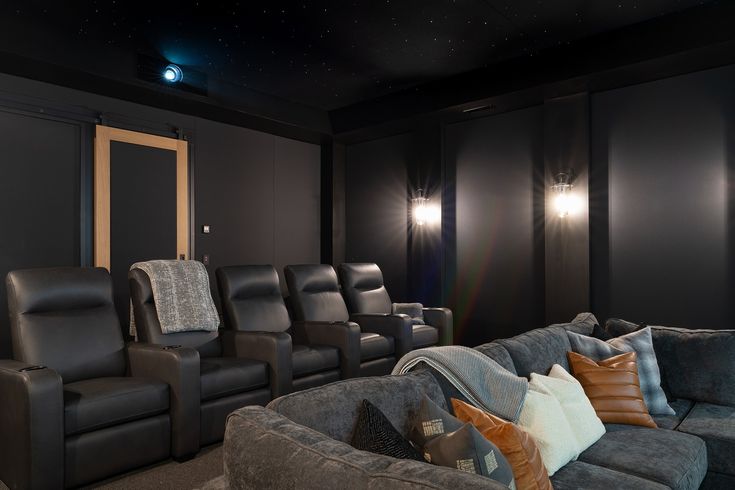
Creating an ideal home theater layout is essential for ensuring an immersive and enjoyable viewing experience. The arrangement of seating, screen, and sound system can greatly influence the quality of your movie nights. Proper planning and understanding of the space will help you design a layout that maximizes comfort and sound, while also enhancing the overall aesthetics of the room.
When planning the layout for your home theater, consider the following key elements: seating arrangements, screen placement, and sound system positioning. Each component plays a vital role in achieving an optimal viewing experience. Additionally, accurately measuring your space will help ensure that all elements fit together harmoniously.
Seating Arrangements
Choosing the right seating arrangement is crucial for comfort and visibility. Here are steps to create an effective seating layout:
1. Distance from Screen: Ideally, the distance between the seats and the screen should be 1.5 to 2.5 times the diagonal screen size. For instance, if you have a 100-inch screen, the optimal viewing distance would be between 12.5 to 20.8 feet.
2. Elevation Levels: Consider tiered seating to enhance visibility. This setup allows each row of seats to view the screen without obstruction.
3. Comfort and Space: Ensure that there is enough space between rows (typically 3 to 4 feet) for easy movement and comfort.
4. Personal Preferences: Tailor the seating to your needs. Recliners, sofas, or dedicated theater chairs can be arranged in a way that maximizes comfort for long viewing sessions.
Screen Placement
The placement of your screen is fundamental for an engaging viewing experience.
– Height: The center of the screen should be at eye level when seated, which is usually around 42 inches from the floor.
– Distance from Walls: Maintain a distance of at least 1 to 2 feet from the back wall to prevent sound distortion and allow for better airflow.
– Angle: If possible, mount the screen on a wall that allows for an optimal viewing angle without head-turning, ideally facing the seating area directly.
Sound System Positioning
A sound system that envelops the viewer in audio will enhance the cinematic experience. Here are key points for effective sound system placement:
– Speaker Placement: Position front speakers at ear level and angled towards the seating area. Place surround speakers slightly above ear level, alongside or behind the seating.
– Subwoofer Location: The placement of the subwoofer can vary. Experiment with different locations in the room to find the spot that provides the best bass response, often referred to as the “subwoofer crawl” method.
– Acoustic Treatments: Consider adding acoustic panels or sound-absorbing materials to improve sound quality and reduce echo.
Measuring Space Effectively
Accurate measurements are vital when planning your home theater to ensure everything fits perfectly.
– Dimensions: Measure the length, width, and height of the room. Note the position of doors, windows, and electrical outlets, which could affect layout decisions.
– Scale Drawings: Create a scaled drawing of the room on graph paper or with design software. This visual representation allows you to experiment with different layouts before implementing them.
– Mockup Arrangements: Use tape or furniture to Artikel the seating and screen positions on the floor to visualize the space and flow before finalizing your decisions.
Common Layout Mistakes to Avoid
Being aware of common layout mistakes can save you time and money during your home theater setup. Consider the following points to avoid pitfalls:
1. Poor Viewing Angles: Ensure that all seats have a clear view of the screen without obstruction from other seats or furniture.
2. Inadequate Sound Design: Forgetting about sound placement can lead to a flat audio experience. Plan for a surround sound setup rather than just a soundbar.
3. Neglecting Lighting: Failing to control ambient lighting can ruin the viewing experience. Use blackout curtains and dimmable lighting to balance the brightness.
4. Ignoring Comfort: Overcrowded layouts can lead to discomfort. Prioritize space between seating to avoid feeling cramped.
5. Not Considering Size: Underestimating the size of the screen or seating can lead to a mismatched experience. Always verify proportions before making purchases.
With careful planning and attention to these details, your home theater can be transformed into a personal cinematic oasis that delivers an exceptional entertainment experience.
Selecting the Right Technology for Your DIY Home Theater
Creating a home theater is an exciting venture that allows you to enjoy cinematic experiences in the comfort of your own living room. However, selecting the right technology is crucial to achieving optimal audio and visual quality. This guide will help you navigate the differences in audio and video formats, explore the latest advancements in technology, and compare various streaming devices to enhance your home theater setup.
Understanding the differences in audio and video formats is essential for a satisfying viewing experience. Video formats like 1080p, 4K, and 8K represent different resolutions, with higher numbers indicating more pixels and greater detail. 4K offers four times the resolution of 1080p, providing sharper images and more vibrant colors. Audio formats vary as well, with stereo, surround sound, and object-based audio (like Dolby Atmos) offering different experiences. Surround sound creates an immersive environment by using multiple speakers placed around the room, while object-based audio allows sound to move freely in a three-dimensional space, enhancing how you perceive audio in films and music.
Latest Technologies: 4K, HDR, and Surround Sound
The integration of advanced technologies such as 4K, High Dynamic Range (HDR), and surround sound significantly upgrades the home theater experience. 4K provides a clearer picture with four times the pixel density of standard HD, making it particularly beneficial for large screens. HDR enhances the contrast and color range, allowing for deeper blacks and brighter whites, resulting in a more lifelike image. It’s important to note that for optimal viewing, both your source material and display device need to support HDR.
Surround sound, particularly systems like Dolby Atmos, elevates audio quality by creating a multi-dimensional soundstage. This technology requires specific hardware such as compatible speakers and receivers, but the immersive experience it provides makes it worthwhile. Many modern TVs and soundbars now come with built-in support for these technologies, making it easier to achieve high-quality sound without extensive setups.
Comparison of Streaming Devices
When it comes to enhancing your home theater setup, streaming devices play a pivotal role. They provide access to various content platforms and support different video and audio formats. Below is a comparison of popular streaming devices and their capabilities:
| Device | Video Quality | Audio Support | Apps Available | Price Range |
|---|---|---|---|---|
| Roku Ultra | 4K, HDR | Dolby Atmos | Over 5000 | $100 – $130 |
| Amazon Fire TV Stick 4K | 4K, HDR | Dolby Atmos | Over 4000 | $50 – $60 |
| Apple TV 4K | 4K, HDR, Dolby Vision | Dolby Atmos | Over 1000 | $180 – $200 |
| Google Chromecast with Google TV | 4K, HDR | Dolby Atmos | Over 4000 | $50 – $60 |
Choosing the right streaming device depends on your budget, preferred content, and desired audio-visual quality. Each device has unique features, ensuring there is an option available for various preferences and setups.
Investing in quality audio and visual technology can significantly enhance your home theater experience, making it feel as if you’re right in the middle of the action.
Designing the Aesthetic Elements of Your Home Theater
Creating a home theater involves more than just selecting the right technology; it’s also about crafting an aesthetic that enhances your viewing experience. The decor, lighting, and seating can transform an ordinary room into a cinematic paradise. By thoughtfully choosing a theme and decor style, you can create a space that reflects your personality while providing the perfect atmosphere for movie nights.
Choosing a theme or decor style is crucial as it sets the tone for the entire room. Whether you prefer a modern, minimalist look or a cozy, vintage feel, your color scheme and materials will play an essential role in achieving that desired ambiance. Consider using deep, rich colors like navy blue or burgundy for a classic cinema vibe, paired with luxurious materials such as velvet or leather for an inviting touch. Alternatively, light colors and sleek materials such as glass and metal can create a contemporary feel that promotes a sense of spaciousness while maintaining a high-tech aesthetic.
Lighting Options for Enhanced Viewing Experience
The right lighting is critical in a home theater, as it not only contributes to the overall design but also affects the viewing quality. Proper lighting can enhance the cinematic experience while ensuring comfort during viewing sessions. Here are some effective lighting options:
– Dimmer Switches: Installing dimmer switches allows you to control the intensity of the light, creating a balanced environment for both watching movies and relaxing.
– Recessed Lighting: This type of lighting can be strategically placed to highlight specific design elements, such as artwork or architectural features, without overwhelming the space.
– LED Strip Lights: These can be installed along the edges of seating or shelves, offering a modern touch and creating a soft glow that adds to the immersive experience.
– Wall Sconces: These provide ambient lighting that can enhance the overall aesthetic while maintaining a focus on the screen. Choose fixtures that coordinate with your decor style for a cohesive look.
– Smart Lighting Systems: With the technology available today, smart lighting systems can be programmed to adjust based on the time of day or the type of content being viewed.
“Lighting is not just about illumination; it’s about creating mood and enhancing the experience.”
Selecting Comfortable Seating for Design and Functionality
Comfortable seating is a cornerstone of any home theater. The right seating not only enhances comfort but also ties together the design elements of the room. When selecting seating, consider the following aspects:
– Recliners: Look for recliner chairs that offer adjustable positions, allowing you to find the most comfortable angle for viewing. Options with built-in cup holders and storage can add functionality.
– Sectional Sofas: These provide ample seating and can be arranged to fit your space perfectly. Opt for materials that are easy to clean and maintain, especially if you plan to have snack sessions during movie nights.
– Theater-Style Seating: For an authentic cinematic experience, consider rows of theater-style seats, preferably with cushioning and incorporated technology for comfort.
– Ottomans and Footrests: Adding ottomans or footrests can enhance relaxation. They can also serve as additional seating when needed.
– Color and Fabric: Choose fabrics that complement the overall theme; darker colors can prevent reflections on the screen and hide stains better, while lighter fabrics can brighten the space.
Incorporating these elements ensures that your home theater remains comfortable and visually appealing, inviting friends and family to enjoy immersive movie experiences for years to come.
Setting Up the Equipment and Wiring for Your Home Theater
Setting up a home theater involves a careful arrangement of various components to create an immersive viewing experience. This process includes selecting appropriate equipment such as projectors, screens, and sound systems, and organizing the wiring to ensure both safety and efficiency. Getting this setup right not only enhances performance but also maintains a clean and aesthetically pleasing environment.
The installation of your home theater equipment should begin with proper planning and an understanding of your space. Start by selecting the location where the projector and screen will be mounted. Ensure that the projector is positioned at the correct distance from the screen for optimal image size and quality. The screen should ideally be mounted on a flat wall, ensuring that there is no glare from windows or other light sources.
Equipment Setup and Installation
A successful setup of your home theater equipment requires attention to detail. Start by securing all necessary components, including the projector, screen, AV receiver, speakers, and any media players or streaming devices.
– Projector Installation: Follow the manufacturer’s guidelines for mounting the projector. It is often best to mount it on the ceiling or a shelf at the back of the room. Use a sturdy mount and ensure that it is level to avoid distorted images. Adjust the zoom and focus settings for clarity.
– Screen Setup: If you choose a fixed screen, mount it securely to the wall at a height that aligns with the viewers’ eye level. For retractable screens, ensure the casing is firmly installed.
– Sound System Configuration: Position the speakers according to the layout of your room. Surround sound systems generally require front, center, and rear speakers, placed at ear level when seated. Subwoofers can be placed near walls for enhanced bass response.
Cable Management Practices
Proper cable management is crucial for maintaining an organized home theater setup and ensuring safety. A cluttered mess of wires can not only be an eyesore but can also create hazards. Here are best practices for managing your cables effectively:
– Use Cable Trays and Raceways: These can be installed along the walls or ceilings to hide cables. They maintain a neat appearance and prevent tangling.
– Label Cables: Use labels on both ends of your cables to easily identify connections. This can save time during troubleshooting or adjustments.
– Group Cables: Bundle similar cables together using cable ties or Velcro straps. Color-coding can also help in distinguishing cable types.
– Avoid Overstretching: Ensure that cables are not stretched too tightly, which can lead to damage or disconnections.
Troubleshooting Common Setup Issues
Despite careful planning, issues may arise during the setup of your home theater. Here’s a step-by-step guide to troubleshoot common problems effectively:
– No Signal from the Projector: Check that the projector is powered on and that the input source is correctly selected. Ensure all cables are securely connected.
– Poor Image Quality: Verify that the projector’s lens is clean and that the focus and zoom settings are adjusted correctly. For screens, ensure they are clean and free of wrinkles or dust.
– Audio Issues: If sound is not coming through the speakers, check your AV receiver settings. Make sure the speakers are correctly connected and the receiver is set to the right input.
– Remote Control Malfunctions: Replace the batteries in the remote and ensure there are no obstructions between the remote and the IR receiver on the equipment.
In summary, setting up a home theater is a systematic process that requires careful planning and execution. Following best practices for equipment placement and cable management not only optimizes performance but also creates a pleasant viewing atmosphere. By being prepared for potential troubleshooting, you can ensure that your home theater experience is as enjoyable and seamless as possible.
Creating an Immersive Sound Environment in Your Home Theater
Crafting a captivating audio experience is essential for any home theater setup. An immersive sound environment transforms your viewing experience, making it feel as though you’re right in the middle of the action. By understanding various surround sound setups, calibrating your audio system, and soundproofing your space, you can elevate your home theater to a cinematic level.
Types of Surround Sound Setups
Choosing the right surround sound setup is crucial for achieving an immersive audio experience. There are several configurations to consider, each with unique advantages tailored to different room sizes and shapes.
- 5.1 Surround Sound: This popular configuration includes five speakers: left, center, right, and two surround speakers, along with a subwoofer for deep bass. Ideal for average-sized rooms, it provides a balanced sound experience.
- 7.1 Surround Sound: An upgrade from the 5.1 setup, this configuration adds two additional surround speakers for enhanced audio depth and directionality. It’s well-suited for larger rooms where sound dispersion is a priority.
- Atmos and Object-Based Audio: Dolby Atmos technology allows sound to be placed anywhere in a 3D space, including overhead. This setup requires additional ceiling speakers or up-firing speakers. It’s perfect for those who want the ultimate cinematic experience.
When selecting the best setup, consider your room dimensions, speaker placement options, and how you plan to use the space. Larger rooms may benefit from the more complex 7.1 or Atmos configurations, while smaller spaces can achieve excellent results with a 5.1 system.
Calibrating Your Audio System
Proper calibration of your audio system is vital for optimal sound quality and effective surround effects. Calibration ensures that sound is balanced across all speakers and tailored to the acoustic properties of your room.
Begin by utilizing an AV receiver’s built-in calibration tools, which often include automatic speaker setup features. These tools use a microphone to measure sound levels and distances, adjusting accordingly.
For more manual calibration, follow these steps:
- Speaker Placement: Position speakers according to the recommended angles and distances, ensuring a clear path for sound waves.
- Level Adjustment: Use a sound meter app or device to adjust the volume levels of each speaker, so they all reach your listening position at the same time.
- Frequency Response: Test and adjust the equalization settings to balance bass, midrange, and treble frequencies according to your preferences.
Proper calibration will not only enhance dialogue clarity but also create a more engaging and enveloping sound experience.
Soundproofing Your Home Theater
Soundproofing is essential to prevent external noise from disrupting your cinematic experience and to contain sound within your theater. Implementing effective soundproofing techniques can dramatically enhance audio quality.
Consider the following strategies:
- Walls: Use mass-loaded vinyl or soundproof drywall to add density to your walls, minimizing sound transmission.
- Doors: Solid core doors can reduce sound leaks, while door sweeps and seals help block gaps.
- Acoustic Panels: Installing panels on the walls can absorb sound reflections, improving clarity and reducing echo.
- Flooring: Carpets or area rugs can significantly dampen sound, while soundproof underlayment adds an extra layer of insulation.
Incorporating these soundproofing methods will enhance your home theater’s overall listening experience, ensuring that you’re completely immersed in your favorite films and music without distractions.
Integrating Smart Technology into Your Home Theater System
Integrating smart technology into your home theater system can significantly elevate your viewing experience. By automating and controlling various components through smart devices, you can enjoy a seamless entertainment setup that enhances convenience, efficiency, and enjoyment. The benefits of this integration range from simplifying the user experience to creating an immersive environment that adjusts according to your preferences.
Smart home integration allows users to control multiple aspects of their home theater from a single device, such as a smartphone or tablet. This centralization simplifies operations, allowing you to manage everything from lighting to sound with just a few taps. For instance, when you start a movie night, a smart system can dim the lights, lower the curtains, and adjust the sound settings all at once, setting the perfect mood for your viewing.
Examples of Smart Devices for Home Theater Control
Numerous smart devices can enhance your home theater experience by allowing you to control lighting, sound systems, and other components. Here are some examples of smart devices that can be integrated into your home theater setup:
- Smart Light Bulbs: These bulbs can be programmed or controlled via apps, enabling you to dim the lights or change colors to match the movie’s atmosphere.
- Smart Plugs: With smart plugs, you can remotely control devices like sound systems and projectors, ensuring they turn on or off as needed.
- Smart Speakers: Devices such as Amazon Echo or Google Nest can provide voice command capabilities for operating your home theater components.
- Smart Thermostats: Maintaining the perfect temperature for a movie night is easy with a smart thermostat that can be adjusted remotely.
- Smart Curtains: These can be opened or closed with a tap on your device, allowing you to manage light and privacy effortlessly.
Popular Smart Home Systems and Compatibility with Home Theater Equipment
When considering smart technology integration, it’s essential to choose a smart home system that is compatible with your existing home theater equipment. Below is a table outlining some of the most popular smart home systems and their compatibility features:
| Smart Home System | Compatibility | Key Features |
|---|---|---|
| Amazon Alexa | Compatible with a wide range of smart devices including lights, plugs, and sound systems. | Voice control, routines for multiple devices, and integration with streaming services. |
| Google Home | Works with smart TVs, streaming devices, and lighting systems. | Voice commands, Google Assistant integration, and smart home app management. |
| Apple HomeKit | Compatible with devices that support HomeKit, including smart speakers and HDMI devices. | Secure access control, Siri voice commands, and automation of devices linked with Apple products. |
| Samsung SmartThings | Broad compatibility with smart bulbs, TVs, and audio systems across various brands. | A customizable app interface, automation options, and integration with multiple device types. |
“Integrating smart technology into your home theater creates a personalized, convenient, and immersive viewing experience.”
Budgeting for Your DIY Home Theater Project
Creating a budget for your DIY home theater project is a crucial step that can determine the success and satisfaction of your setup. It involves more than just allocating funds for a television or projector; there are many elements and potential hidden costs to consider. This guide will help you Artikel a budget that not only meets your aspirations but also prepares you for unexpected expenses along the way.
Understanding all the cost components of a DIY home theater project is essential. You might think of the primary expenses, such as the screen, audio system, and seating, but there are several hidden costs that could catch you off guard. These include expenses for cables, installation tools, and even room modifications. A comprehensive budget will help you avoid overspending while ensuring that you achieve a high-quality setup that meets your expectations.
Identifying Costs and Hidden Expenses
When planning your home theater budget, it’s important to identify all potential costs. Here’s a breakdown of typical expenses that you should include:
- Display Equipment: This includes the cost of a projector or television. Consider the size and resolution that fits your needs.
- Audio System: Invest in quality speakers, a receiver, and possibly a subwoofer to enhance your sound experience.
- Seating: Comfortable seating is crucial. Look into recliners, sofas, or even home theater chairs.
- Screen and Mounting: If using a projector, factor in the cost of a screen and mounting equipment.
- Cables and Accessories: HDMI cables, speaker wires, and other necessary accessories often add up. Don’t overlook this category.
- Room Treatments: Acoustic panels and soundproofing materials can improve sound quality but often come at an additional cost.
- Lighting: Consider options for dimmable lights or blackout curtains to enhance the viewing experience.
- Installation Costs: If you’re not DIY-savvy, hiring a professional can be a hidden expense you need to plan for.
“Being thorough in your budgeting will prevent unexpected expenses from derailing your home theater project.”
Strategies for Saving Money
Achieving a high-quality setup doesn’t mean you have to break the bank. Here are several strategies you can adopt to save money on your home theater project without compromising quality:
- Buy Used Equipment: Consider purchasing second-hand or refurbished audio and video equipment. Many people sell their systems when upgrading.
- Do It Yourself: Handle installation and minor construction yourself to save on labor costs. There are plenty of online tutorials to guide you.
- Shop Sales and Discounts: Keep an eye out for sales events, especially during holidays, to snag equipment at lower prices.
- Consider Budget Brands: Research brands that offer good quality at lower prices. Brands like Vizio and TCL, for instance, provide excellent performance without the premium price tag.
- Leverage Existing Furniture: Repurpose furniture you already own. You can transform your living room into a theater without spending on new seating.
“With strategic planning and smart purchasing, a fantastic home theater is within reach for every budget.”
Budget-Friendly Alternatives
There are several budget-friendly alternatives to expensive equipment that still deliver impressive results. Here are a few options to consider:
- Smart TVs vs. Projectors: Instead of investing in a high-end projector, a quality smart TV can provide stunning visuals at a comparable price.
- Soundbars over Surround Sound Systems: A good soundbar can provide rich audio without the complexity and expense of a full surround sound setup.
- DIY Screen Solutions: Create a projector screen using a smooth wall or even a white sheet, which can save you significantly compared to buying a commercial screen.
- Affordable Streaming Devices: Instead of subscribing to cable, consider a streaming device like Roku or Amazon Fire Stick, which can provide a wide range of content at a lower cost.
- Focus on Acoustic Treatments: DIY acoustic panels using materials like foam or fabric-wrapped insulation can enhance sound quality without a hefty price tag.
“Smart alternatives can help you build a home theater that impresses without the stress of overspending.”
Outcome Summary
In conclusion, establishing a DIY home theater is an exciting journey that combines technology, design, and creativity. By following the insights shared in this guide, you’ll be well on your way to crafting a space that not only enhances your viewing experiences but also becomes a cherished gathering spot for family and friends.
FAQ Overview
What is the best screen size for my room?
The best screen size depends on your viewing distance; a general rule is that the screen height should be about one-third of the distance from the screen to your seating.
How can I improve sound quality in my home theater?
Improving sound quality can often be achieved by properly positioning speakers, calibrating your audio system, and adding soundproofing materials to reduce echo and background noise.
Is it necessary to use a projector instead of a TV?
It depends on personal preference and space; projectors offer a larger image for a cinematic experience, while TVs can provide better brightness and clarity in well-lit rooms.
What are some budget-friendly options for a sound system?
Look for compact soundbars or home theater in a box systems that provide good quality without breaking the bank, and consider brands that offer good warranties and customer support.
Can I integrate my smart home devices with my home theater?
Yes, many smart home devices can be integrated with your home theater system, allowing you to control lighting, sound, and streaming services all from a single interface.